
Welcome Proctors, Tutors, and Entryways
Want to learn more about CrimsonZip? How about earning FREE swag?
Start using CrimsonZip, create your 1st group and have a few people join to earn your own 24oz vacuum insulted tumbler!
Stop by Rm 53 in the HEB dept (Peabody) to redeem.

Learn More / FAQ
How do I get started as a proctor, tutor, or entryway
Easy! Just start creating groups and events and let your student’s know. MORGAN EXPAND THIS SECTION
I can’t create a group under my House name?
House, yard, department, location, school, and role, are authorization only groups. Please reach out to us to be able create groups and events within any of these.
We’re happy to demonstrate how CrimsonZip can best be utilize by your group, and can assist with group/event creation and setup, membership management (bulk invites and enrollments), and other support services. We can be contacted at Contact@crimsonzip.org or you can schedule a meeting during our “office hours” (held on Tue 0900-1600).
Types of users
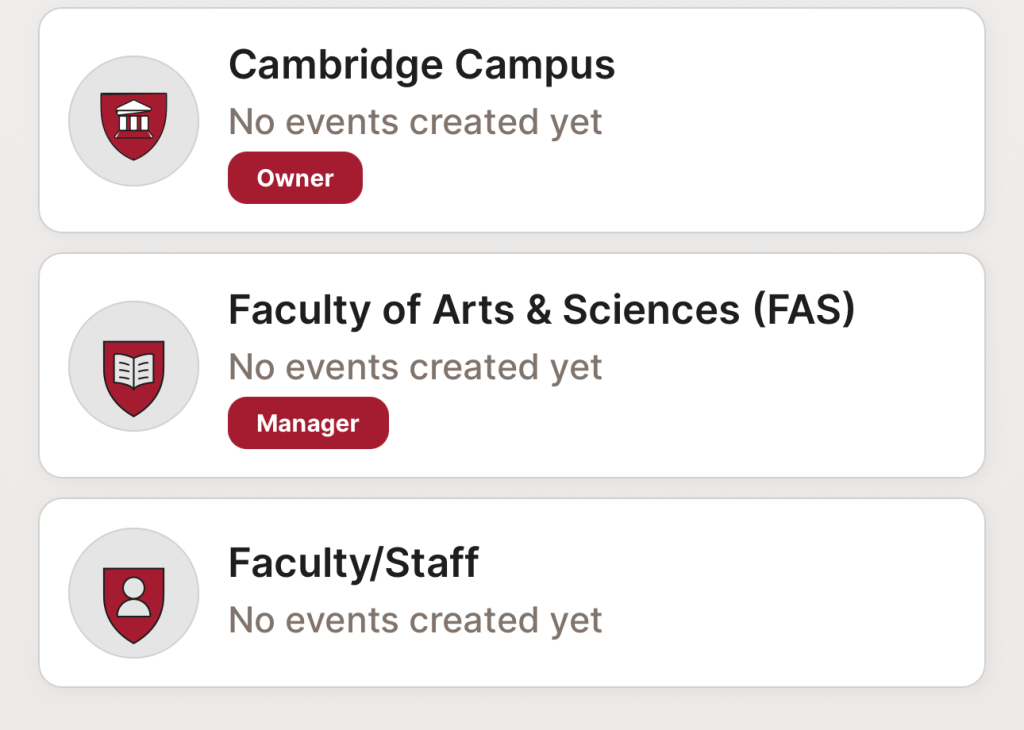
CrimsonZip has three types of typical users: Owners, Managers, and Users. The default user type is “User”. Owner and Managers are denoted by a label underneath the description. General users do not have a user type label.
Owners are the creators of the group and can manage membership in the group, create/modify/delete events, and delete the group. Managers and do everything the owner can except for deleting the group. Users can see all the upcoming events hosted by the group. There is no limit to the number of managers or users for each group.
New features?
We’re working on a number of new features to specifically help Proctors, Tutors, and Entryways. One new feature is share sheet functionality where you will be able to promote your group or event through your favorite method of outreach (e.g., Instagram, X, email, etc…). A couple of taps and all the important details will be sent out.
This is just one of the new features coming to CrimsonZip, so stay tuned.
Can I get more help?
We’re happy to demonstrate how CrimsonZip can best be utilize by your group, and can assist with group/event creation and setup, membership management (bulk invites and enrollments), and other support services. We can be contacted at Contact@crimsonzip.org or you can schedule a meeting during our “office hours” (held on Tue 0900-1600).
Help & How-to’s
Creating Groups
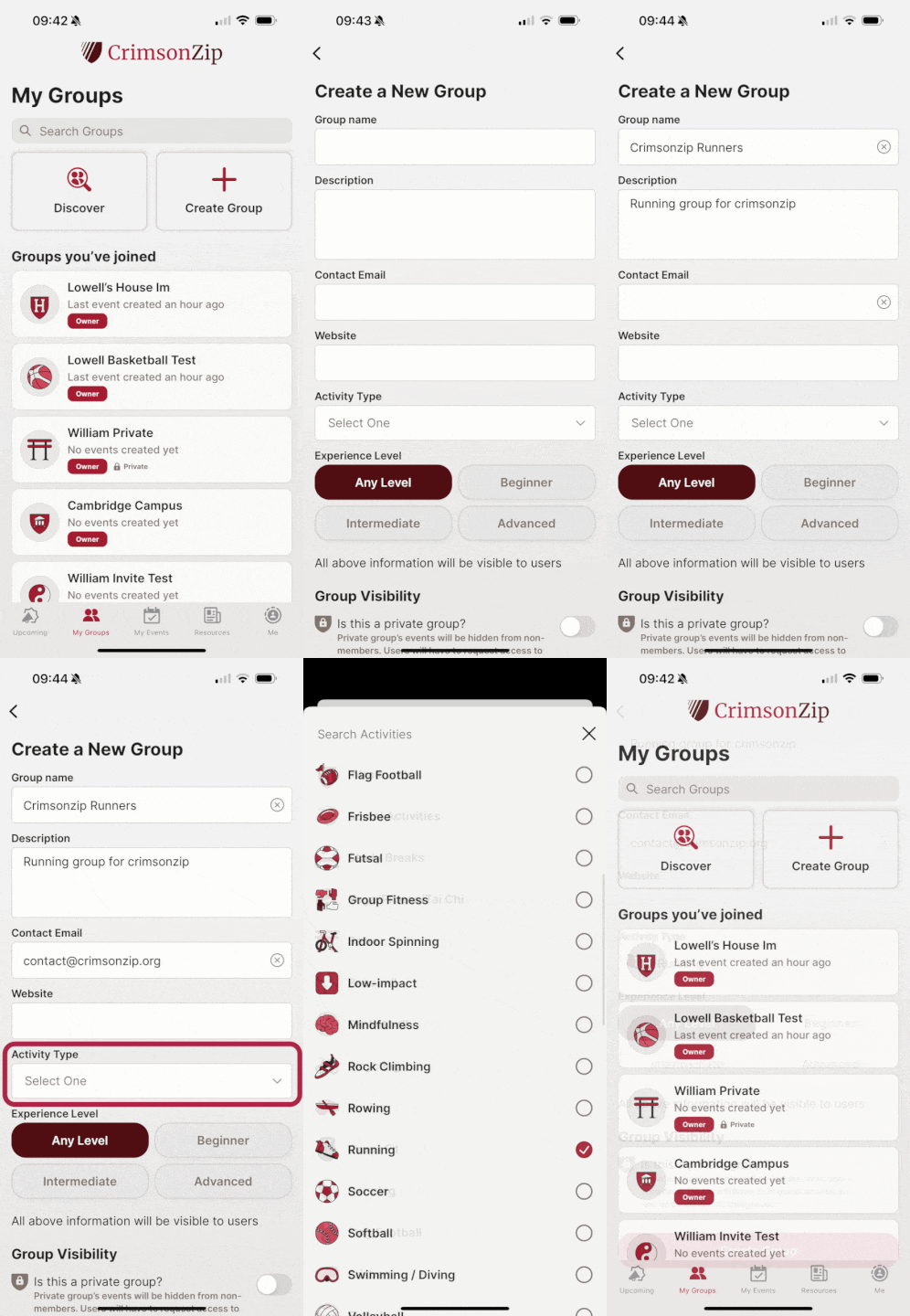
CrimsonZip users can create and manage groups for their favorite activities:
- Group name: Name for your group. Please remember to follow Harvard community guidelines.
- Description: Description of your group’s activities
- Email: Contact email for group organizer. This field will be pre-filled but you may change it as needed
- Website: Optional website URL for the event or organizing group as applicable.
- Activity type: Select the main type of activity for the group. Individual events can be of a different type from the group, for example, a running group may create events focused on non-running activities like yoga.
- Experience type: indicate an average experience level for the group, or select any to indicate the group is open to all levels of experience.
- Group visibility: Is the group a public group, i.e., open to the public and do not need an invitation or approval to join the group. Or private where a user will need to be invited or request to join the group. Private groups will not be listed when finding group and can only be found by searching for the group’s specific name.

Deleting Groups
Groups that are no longer active or desired can be deleted by an owner. There are a few steps to deleting a group as it is a permanent deletion (can not be undone).
Inviting & Managing Members
CrimsonZip allows users to invite other users to their groups, and to promote / demote and remove users.
- Invites can be sent for both private and public groups. Users can add as many email addresses as they like. For bulk invites please contact us at contact@crimsonzip.org for additional help.
- Inviting is one way users can join private groups.
- Users will be notified of the invite in app or via email.
- Owners and managers of groups may promote or demote other users of the group.

Creating Events
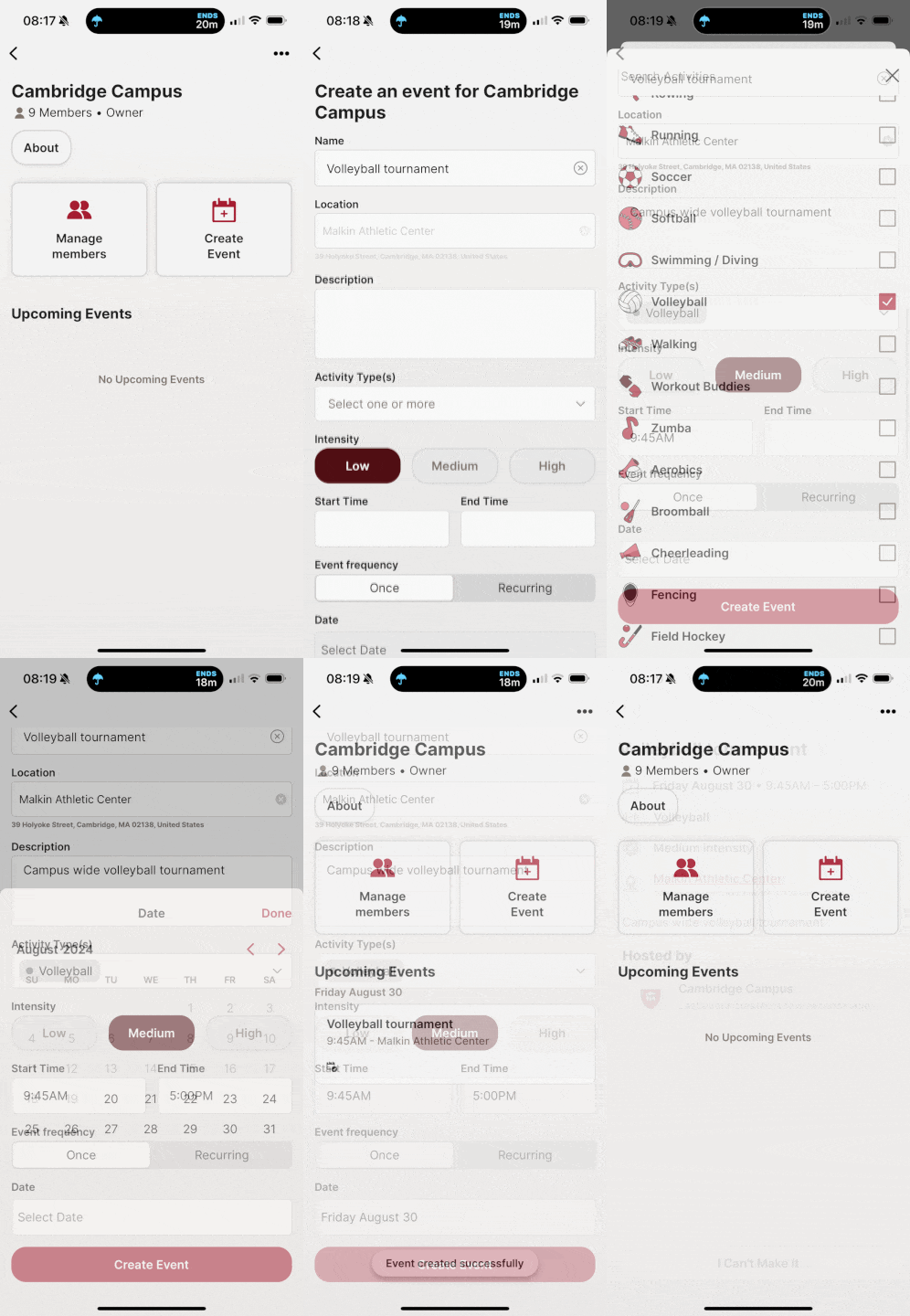
Events can be created for any group the user is a manager or owner of. To create events first navigate to the group.
- Events require the event name, location, date and time
- Events can be one time or recurring, i.e., every 1st Saturday of the month, or every Tuesday and Thursday of the week
- Once events are created they appear in the upcoming events section of the group details and be pushed to all members of the group
 CrimsonZip